Introduction
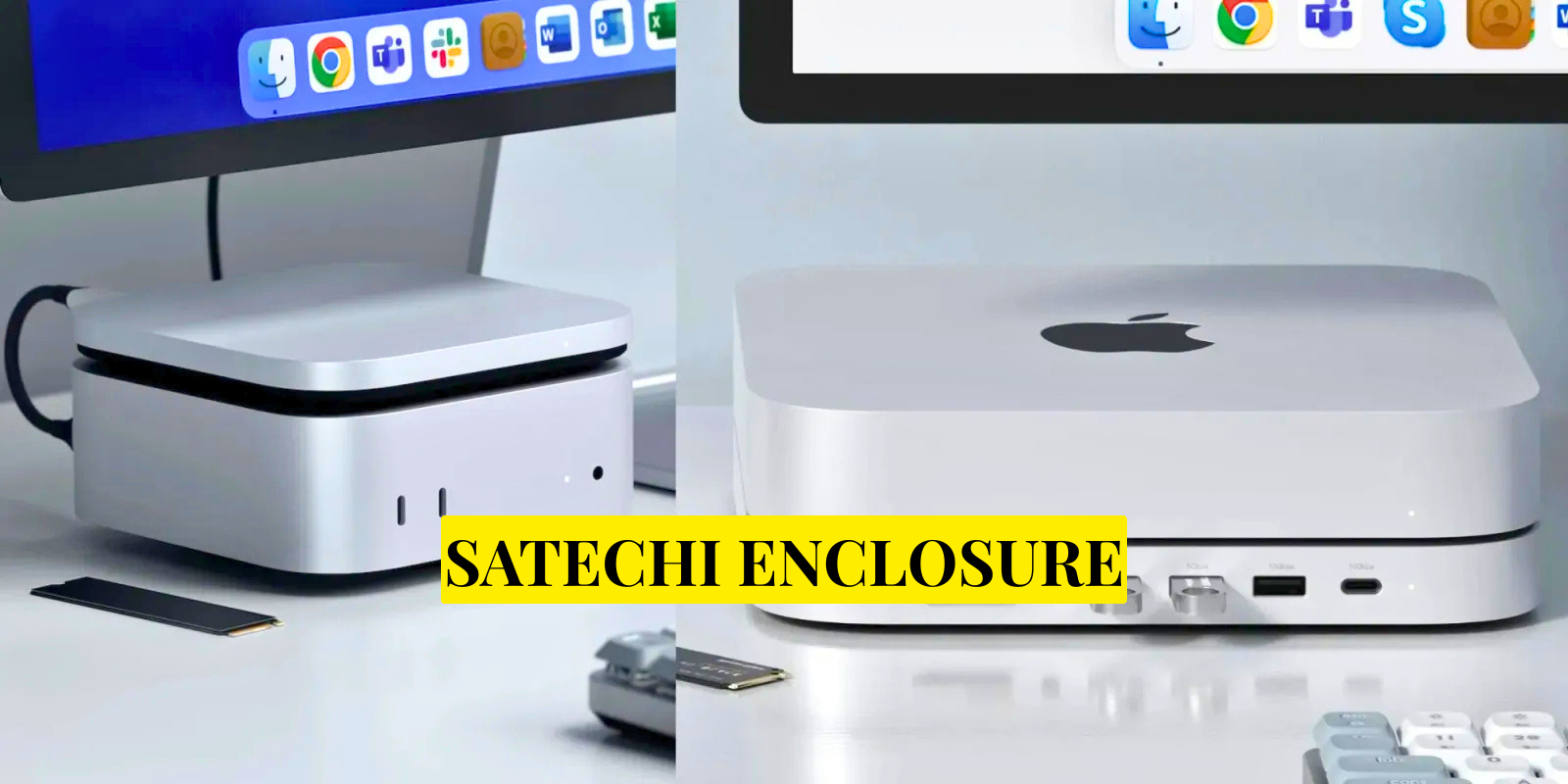
The Satechi Enclosure is a modern storage accessory designed to convert an internal M.2 SSD into a portable external drive. In simple terms, it allows users to take a fast internal SSD and use it like a USB-C external storage device. This makes it extremely useful for people who need fast, reliable, and portable data storage in their daily work or study routine.
In today’s digital environment, file sizes are constantly increasing. From 4K videos to software projects and large game files, traditional USB drives are no longer enough. The Satechi Enclosure solves this problem by combining SSD performance with external portability in a compact and elegant design.
What is Satechi Enclosure
The Satechi Enclosure is a protective casing that holds an M.2 SSD and connects it to devices through USB-C. Once installed, the SSD works as an external drive without requiring any software or complicated setup.
It supports different types of SSDs depending on the model, including NVMe and SATA variants. This flexibility allows users to reuse old SSDs or install new high-speed drives for better performance.
| Feature | Details |
|---|---|
| Product Type | M.2 SSD External Enclosure |
| Purpose | Converts internal SSD into portable USB-C drive |
| Supported SSDs | M.2 NVMe and M.2 SATA (model dependent) |
| Connection Type | USB-C (USB 3.1 / USB 3.2 Gen 2) |
| Max Speed | Up to 10 Gbps (with NVMe SSD) |
| Build Material | Aluminum body for durability and cooling |
| Compatibility | MacBook, Windows, Linux, USB-C devices |
| Installation | Plug-and-play, no software required |
| Use Cases | Backup, gaming, video editing, file transfer |
| SSD Included | No (sold separately) |
| Portability | Compact and lightweight design |
| Cooling System | Thermal pads + aluminum heat dissipation |
Design and Build Quality
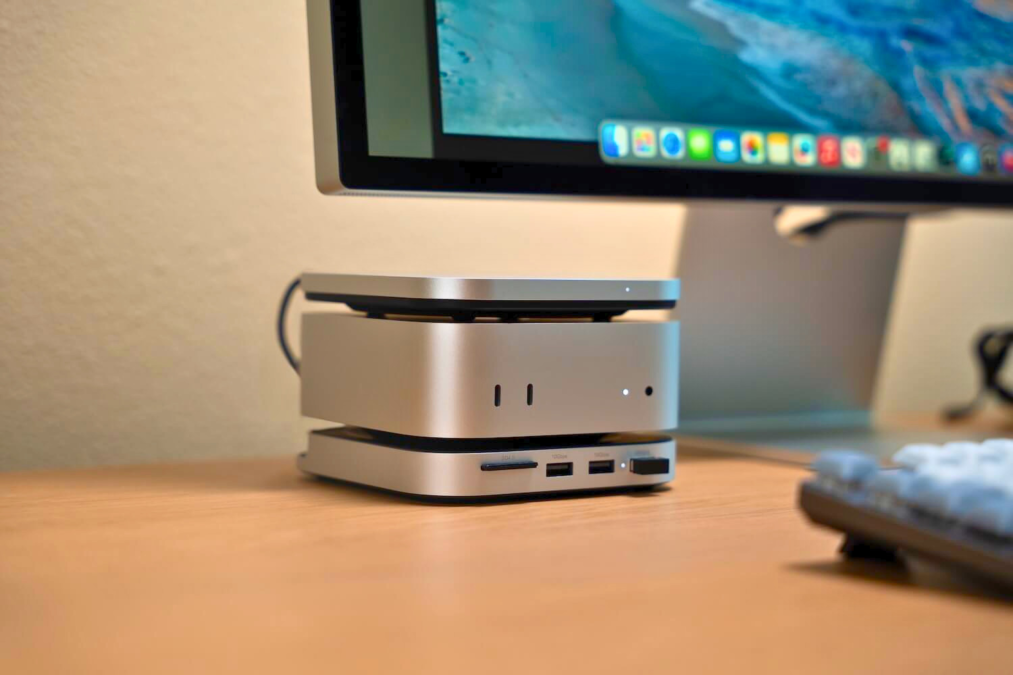
One of the most noticeable features of the Satechi Enclosure is its premium design. It is made from aluminum material, which gives it both durability and a clean modern look. The design is minimal and compact, making it easy to carry in a pocket or laptop bag.
The aluminum body also helps with heat dissipation. Since SSDs can generate heat during heavy file transfers, the enclosure uses its metal structure and internal thermal pads to maintain stable performance. This makes it suitable for long-term use, especially during large data transfers.
How It Works
The working process of the Satechi Enclosure is very simple and user-friendly. First, the M.2 SSD is inserted into the internal slot of the enclosure. After securing it properly, the enclosure is closed and connected to a device using a USB-C cable.
Once connected, the system automatically recognizes it as an external storage device. There is no need for drivers, software installation, or additional configuration. This plug-and-play experience is one of the reasons why it is popular among both beginners and professionals.
Performance and Speed
Performance is one of the strongest advantages of the Satechi Enclosure. When paired with a high-quality NVMe SSD and a USB 3.2 Gen 2 port, it can deliver transfer speeds of up to 10 Gbps under ideal conditions.
In practical usage, this means large files such as videos, games, or project folders can be transferred within seconds. It also allows professionals to work directly from the external SSD without experiencing lag or delay.
However, actual performance depends on several factors, including the SSD type, cable quality, and the device’s USB port capability.
Compatibility and Storage Support
The Satechi Enclosure is widely compatible with different devices and operating systems. It works with MacBook, Windows laptops, Linux systems, and USB-C tablets, making it highly versatile.
It supports multiple SSD sizes such as 2242, 2260, and 2280, which are the most common M.2 formats. File system compatibility includes exFAT for cross-platform use, as well as NTFS and APFS depending on the operating system.
This broad compatibility makes it suitable for users who work across multiple devices and platforms.
Real-World Use Cases
The Satechi Enclosure is used in many practical scenarios. One of the most common uses is expanding storage for laptops that do not support internal upgrades. Users can simply install an SSD into the enclosure and gain instant extra storage space.
It is also widely used in video editing workflows. Editors often work with large 4K or 8K files, and the enclosure allows them to edit directly from external storage without performance issues.
Gamers also benefit from it by storing large game libraries externally and transferring them between systems easily. Additionally, it is useful for data backups and professional file transfers.
Advantages of Satechi Enclosure
The Satechi Enclosure offers several important advantages. It provides a cost-effective way to reuse old SSDs, reducing the need to purchase expensive external drives. It also delivers high-speed performance compared to traditional USB flash drives.
Its compact design makes it highly portable, while the aluminum body ensures durability and better heat management. The plug-and-play functionality adds convenience, making it accessible even for non-technical users.
Limitations of the Device
Despite its strengths, the Satechi Enclosure has a few limitations. It does not include an SSD, meaning users must purchase one separately. Performance is also dependent on the quality of the installed SSD and the USB port being used.
During heavy usage, the enclosure may become warm, which is normal for high-speed SSD operations. Additionally, some SSDs with large heatsinks may not fit inside the enclosure properly.
Installation Process
Installing an SSD into the Satechi Enclosure is a straightforward process. The enclosure is opened, the SSD is inserted into the M.2 slot, and then secured using a screw or latch depending on the model. After closing the case, it is connected to a device using a USB-C cable.
Once connected, the drive is immediately recognized and ready for use without any additional setup.
Maintenance and Care
To ensure long-lasting performance, it is important to handle the enclosure carefully. Users should avoid disconnecting it during active file transfers and should use high-quality USB-C cables for stable performance.
Keeping the enclosure in a cool and dry environment helps maintain its durability. Regular care ensures that both the SSD and enclosure perform efficiently over time.
Important Clarification
The Satechi Enclosure is a hardware product, not a person or celebrity. Therefore, personal attributes such as age, height, family background, net worth, or social media presence do not apply. Its value is based entirely on its engineering design, performance, and usability
Who Should Use It
The Satechi Enclosure is ideal for students, professionals, content creators, and gamers. Anyone who deals with large files or needs portable high-speed storage can benefit from it. It is especially useful for users who want to reuse old SSDs or avoid expensive internal storage upgrades.
Conclusion
The Satechi Enclosure stands out as a practical and premium storage solution in the modern tech world. It combines speed, simplicity, and portability in a compact design that fits easily into everyday workflows.
While it is not the cheapest option available, it offers reliability and performance that make it a valuable investment. Whether for professional work, gaming, or personal storage, it provides a seamless way to manage and carry data efficiently.
In a world where digital storage needs are constantly growing, the Satechi Enclosure delivers a simple yet powerful solution that bridges the gap between internal SSD performance and external convenience.
FAQs Satechi Enclosure
Q: What is a Satechi Enclosure used for?
A: It is used to convert an M.2 SSD into a portable external USB-C storage drive.
Q: Does Satechi Enclosure come with an SSD?
A: No, you must buy the M.2 SSD separately and install it inside the enclosure.
Q: Is Satechi Enclosure fast for file transfers?
A: Yes, it can deliver very high speeds, especially with NVMe SSDs and USB 3.2 support.
Q: Can I use it with Mac and Windows?
A: Yes, it works with MacBook, Windows PCs, Linux, and other USB-C devices.
Q: Is it good for gaming and video editing?
A: Yes, it is widely used for storing games and editing large video files smoothly.